

Tech thoughts — June 2026
Settings I've rage-toggled, features I don't want to give up wishing for, and workarounds holding my life together. Get tech-y and annoyed with me. It's free.
Technology is hard. But it doesn’t have to be.
I’m not a professional. I don’t work for a tech company. I’ve never been employed by Amazon or Best Buy. And I certainly didn’t cancel your favorite show. But I do write about culture. I do have business degrees. And I do have a media diet that would turn the average couch potato into French fries. So, yeah, one could say that I’ve had many thoughts, gathered tips, and faced torments involving technology.
Here are some of them that have taken up my bandwidth in 2026. I hope some turn out to be sort of helpful, or even cathartic.
1. Skip Google AI Overviews by adding -AI to your Google search.
It wasn’t until the other day that I realized this was not widely known or considered public information. If you add -AI to your Google search, you won’t see any AI component in the results. No AI Overviews or anything else.
This has been a feature since Google AI Overviews were introduced.
A spoiler-free heads-up: Certain concepts explored in the A24 film Backrooms are called “liminal spaces.”
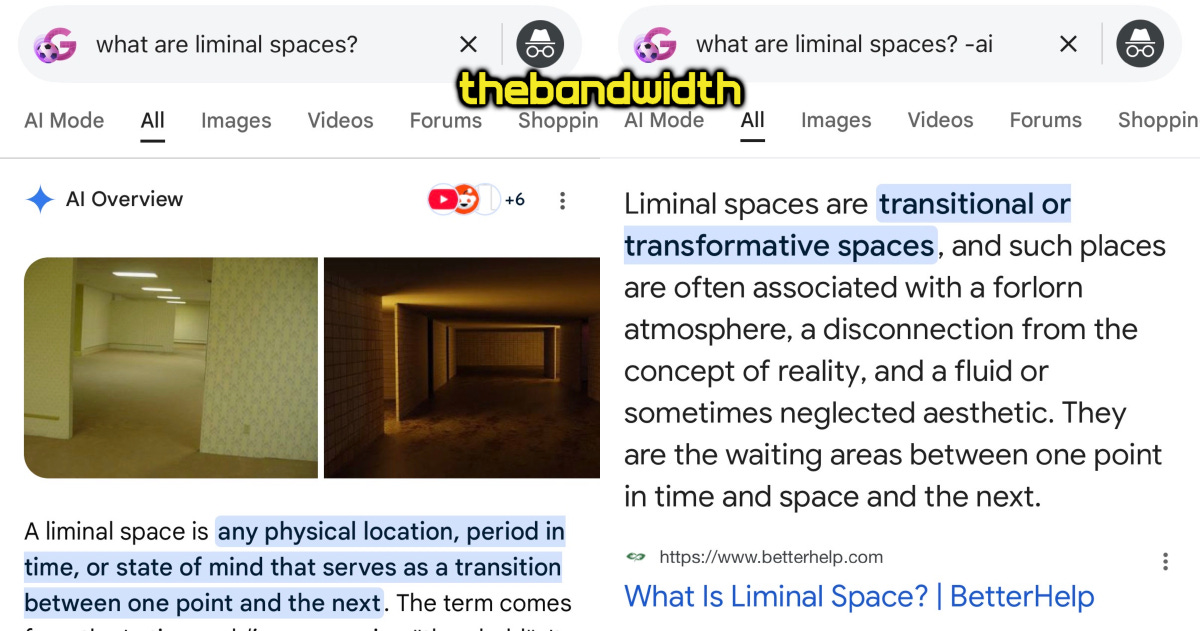
On the left image (below), you see a regular search of “what are liminal spaces?” on Google’s iOS app on Monday, June 29. You see the usual AI Overview pop up, which probably rightly assumes you’re looking for the meaning of “liminal spaces” as it pertains to Backrooms.
On the right image (below), -AI is added when searching on the exact same iOS app for Google, also on Monday, June 29. You get a standard list of results, and the first link shows a psychological definition of “liminal spaces” from BetterHelp.com. The second result is a Reddit thread on r/explainlikeimfive, so you must click on that result to read the thread on Reddit, like the internet used to work back in the day.
Again, being fair here, this feature has been available since Google introduced AI features. Or at least as far as I’ve known the AI features to be active (and growing).
I have no knowledge of if/when this option will go away. As of this writing, it works.
2. Playlists for film/TV streaming services.
This might be a wild concept for streaming service owners to follow, so let’s do our best.
You know playlists, the user-curated lists with songs that we did on iPods? The same ones we now do on Spotify, Apple Music, Amazon Music, and other music streaming services? The ones that also exist on YouTube? (And, yes, we agree, it’s truly magical that we got something like Backrooms from a YouTube creator. No one would’ve guessed it. You are so right, man!)
Anyway! So, imagine those playlists, but for movie and TV streaming services.
I’m going to let that sit for a second. But, yes, I mean exactly what I said.
Netflix, Prime Video, HBO Max, Paramount+, Peacock, Disney+, Hulu, and Apple TV+ giving us the option to create lists of movies and/or TV shows (plus specific episodes!) at will. A few crazy ideas just off the top of my head:
Gaggiest RuPaul's Drag Race episodes of all time according to your c*ntiest friend.
Worst holiday movies of the 2000s. (Have you seen Christmas with the Kranks?! Don’t.)
Batshit crazy America’s Next Top Model episodes that’ll make you beg for a new season, actually.
All 67 seminal films praised by Chloë Sevigny during that Actors on Actors she did with Kim Kardashian.
Horny Law & Order: SVU episodes (for Bensler shippers only).
Besides the fun in creating curated playlist, it’s just kind of bonkers to have one singular watchlist for everything you want to see on a streaming service. “My List” on Paramount+ is an endless vortex that includes the Madonna: Madame X special, every spinoff of RuPaul's Drag Race, a Showtime documentary about Charlie Chaplin, the original The Talented Mr. Ripley, the recent Mean Girls (musical version), the Matt Rogers: Have You Heard of Christmas? special that I love, Yellowjackets, and I Love Lucy.
Like, is this chaotic mess really necessary?
2.5. …Shareable playlists with links, please!
Just in case this isn’t clear: those playlists with movies and TV shows should be shareable as links.
Come on, buddy! This is free advertising for your streaming service’s catalog of movies and TV shows. Why not let other subscribers add user-curated playlists to their libraries?
I know that streamers want to control over what is being watched. I also understand how licensed content works — and how content just eventually disappears in the eyes of users who don't get it — but something’s gotta give. It won’t be nerdy users yearning for shareable curated playlists of their favorite films and TV series who will take down your all-powerful streaming empire.
And if it is, then, we march at— well, not at dawn, but at some point in the very near future. Don’t sleep on us!!! But do do the playlists, pretty please?
3. AI aren’t friends, nor food.
AI models and chatbots aren’t people. We should stop using names that suggest they are and words that legitimize chats as human interactions. Your ChatGPT doesn’t need that “please.” Your Claude doesn’t care if you said “thank you.”
“I think we should stop calling them chatbots, which is a very sweet term for synthetic beings. We have to stop calling them chatbots as if they’re adorable little plush toys.” — Kara Swisher during the On With Kara Swisher podcast. (Episode: Apple Podcasts / Spotify)
4. The YouTube app on Apple TV is a menace.
So Trixie Mattel has just dropped a new video with Alaska. I love the girlies and can’t wait to watch it. But as I scroll over to that thumbnail on the YouTube app on Apple TV, I wonder if I’ve missed out on one or two videos from Trixie’s channel in the last few weeks. So I hard-press on the thumbnail with the intention of going to Trixie’s channel and seeing if I missed anything. These are the options I get before reaching “Go to channel.”
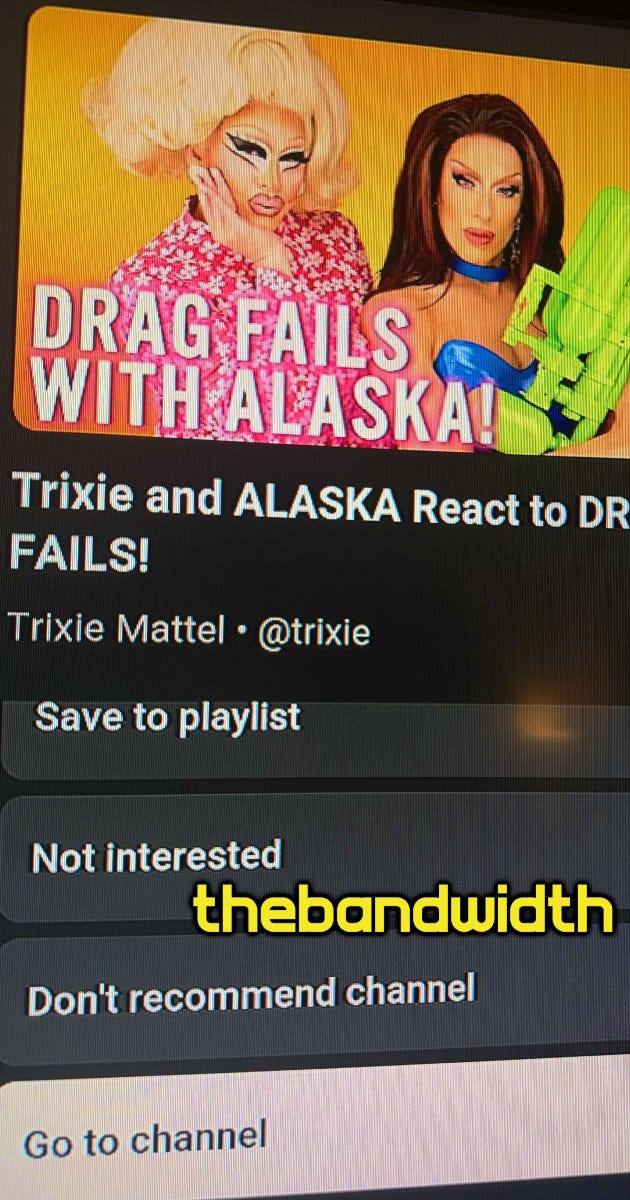
Option A: “Not interested.” Telling the algorithm that you are directly uninterested in videos with Trixie, Alaska, or perhaps even any other drag queen.
Option B: “Don't recommend channel.” Even though I’m literally subscribed to Trixie’s channel, this is an opportunity for me to randomly tell YouTube I don’t want them to recommend me videos from her.
Option C: “Go to channel.” This is the option I was aiming for the entire time. But In a blink-and-you-miss-it moment, I could’ve easily just told YouTube that I’m not interested in these videos and/or that I don’t want this channel to be recommended to my feed. All because I’m a fan who wanted to make sure that I’m all caught up on previous videos before starting a new one.
There is no logical explanation for this succession of options that precede “Go to channel.” I don’t understand why the menu flows this way, and I really wish it would change.
5. Instagram Carousel posts should let us to embed the photo or video we want.
I went to New York City with my niece earlier this year and we took lots of cute photos. I’ll use the one below as an example.
When you embed an Instagram Carousel post, you always see the front image or video (from slide 1) in the embed. But what if I wanted to actually reference something better shown in, I don’t know, the video from slide 2 or photo from slide 3?!
It’s way too 2026 for us to be unable to single-out — and show it in an embed — the particular photo or video in the Instagram Carousel that we’d like to mention. Come on, people!
6. Copying text from photos.
Something else I’ve learned recently that many people don’t know about is the ability to copy text straight from photos on your iPhone’s default app for pictures.
(People who are aware of this feature are probably giggling that I’m explaining this. But let’s practice less judgy vibes in 2026, eh?)
Anyway, back to the matter at hand.
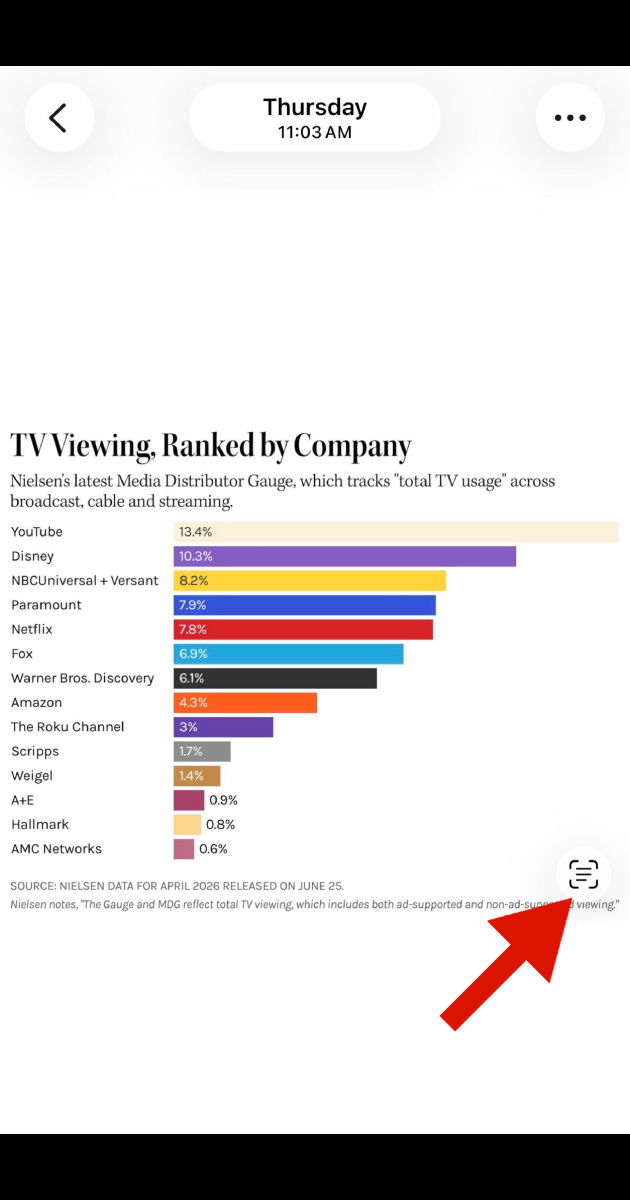
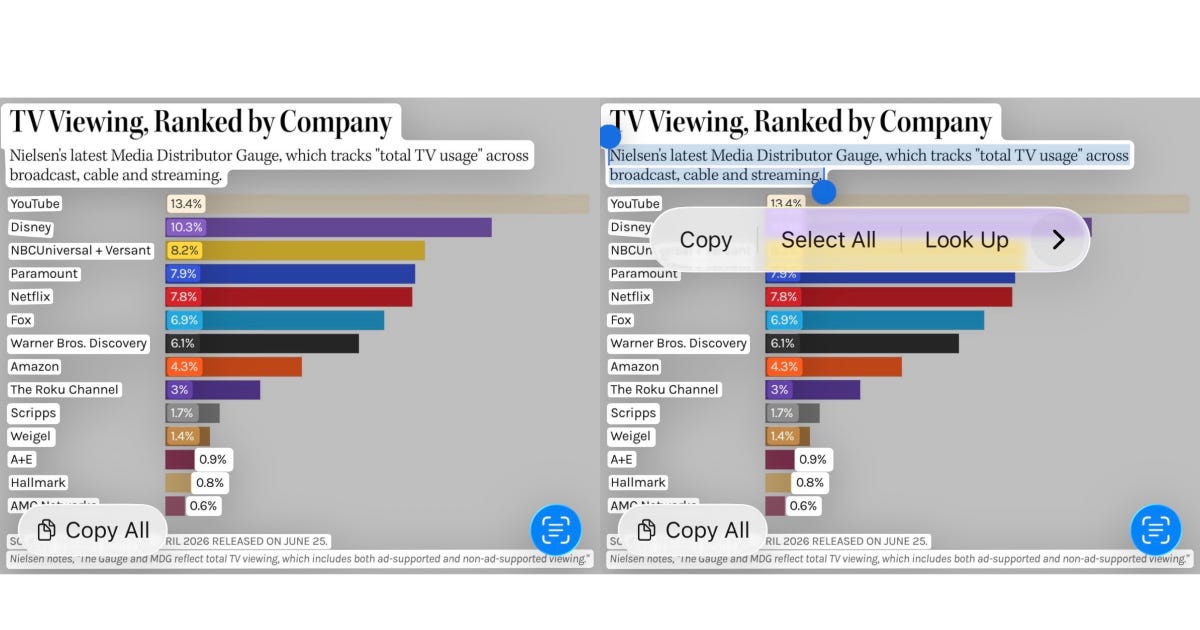
It all starts with that weird square-looking button with lines inside it. When you click it, the button itself turns blue, and you can see the text in your photo popping up (as seen in the left image below). You are then free to just select any piece of the text in your image, as I did (seen in the right image below).
You can copy that text and paste it anywhere, just like any text. You also have the option (seen in the lower left corner) to Copy All. In the case of a chart, though, that information will be all over the place. The feature copies the text itself and none of the other visual cues, so text from a chart wouldn’t look this neat without the graphics and colors. Just be mindful of it, and you’re good.
7. ‘Podcast’ as the name of a format for content.
People are very passionate about this one.
In 2026, the average consumer understands a “podcast” as an informal interview that can be watched on video or listened to on audio. Many consumers enjoy and prefer video, but not all podcasts are filmed on video.
By definition, a “podcast” is “a program (as of music or talk) made available in digital format for automatic download over the Internet.” What most people think a podcast is could actually be called:
A vidcast
A talk show
A web show
A YouTube video
A video interview
A collab (maybe)
A podcast is, rather precisely, an audio conversation between people that wasn’t meant to be consumed visually. Think of it like a radio program.
On the other hand: as someone who grew up speaking one language, became fluent in a second language, and explored a few others along the way, I think language is fluid and alive. Words do mean things, and we should know what we mean so that we can mean what we say.
But certain things just aren’t that deep. Most OG podcasters I listen to still don’t have video and have no intention to add video. A complainer should do a quick scroll on their feed and see hundreds of episodes released before this individual even knew where to find podcasts.
New podcasters face a tougher challenge if they want to just do audio but have audiences urging for video. I still think the right audience will stick by you if the content is good. I still listen to The Read, Alright Mary, Awards Chatter, Girl Historians, and Seek Treatment are all audio-only. Some of them have done video episodes — or have them behind paywalls — but I still experience them as just audio, and it’s wonderful.
I also think podcasters who don’t want to do video don’t need to fight over semantics. Tell your audience that your podcast is an audio-only experience and that video will not be added. It should be that simple. Other creators enjoy video, will add video to podcasts, and will keep calling them podcasts. That’s OK, too.
We have bigger fish to fry.


